
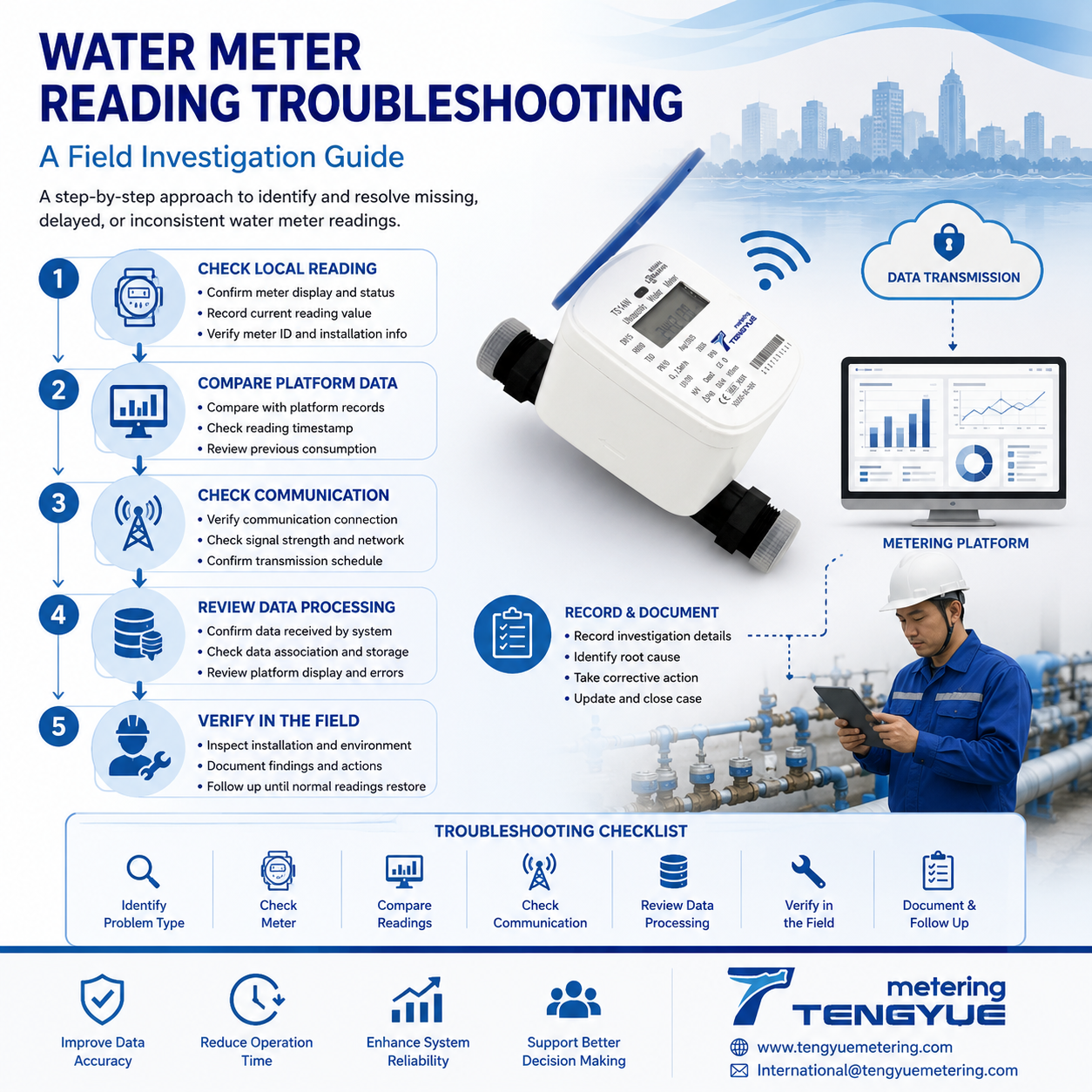
Water meter reading troubleshooting is the structured process of finding why a reading is missing, delayed, or inconsistent—before replacing equipment. Accurate water meter readings are essential for daily utility operations, consumption monitoring, billing, and water network management. However, water utilities may sometimes encounter situations where meter readings are missing, delayed, or inconsistent with the information displayed on the meter itself.
For example, a water meter may display a consumption value locally, while the corresponding reading does not appear in the remote monitoring platform. In other cases, the platform may show an outdated value, or the recorded consumption may differ from the field reading. These problems do not always mean that the water meter is defective. The cause may be related to the meter itself, communication conditions, data transmission, platform processing, or the way readings are recorded and compared.
A structured troubleshooting process helps field teams identify the source of the problem before replacing equipment or making unnecessary adjustments. This guide explains how water utilities can investigate common water meter reading problems step by step.
Why Water Meter Reading Troubleshooting Needs a Structured Process
Water meter reading problems can originate at three distinct stages: reading generation (the meter produces a value), data transmission (the value moves through the communication system), and data presentation (the platform receives, processes, and displays the record). A problem at any stage can produce a missing or inconsistent reading.
ISO 4064 and OIML R49 provide widely used frameworks for water meter accuracy and testing. IEC 62056 / DLMS-COSEM is common in smart metering communication. ISO 55000 asset management principles support aligning asset information with operational decisions. These standards help define requirements, but they do not replace a project-specific troubleshooting process.
For DMA monitoring and water balance analysis, a missing meter reading can distort the balance and delay leak investigation. A 15-minute data interval is often used for DMA monitoring; if readings are missing, the utility may need a 28-day rolling review to distinguish a temporary gap from a sustained problem.
Identify the Problem Type and Check the Meter’s Local Reading
Before starting an investigation, identify exactly what has happened. Different symptoms may point to different parts of the metering process. Common situations include:
Missing readings: The meter is installed and operating, but no new reading appears in the remote reading system.
Delayed readings: The platform displays a reading, but the update time is later than expected.
Inconsistent readings: The value shown on the meter does not match the corresponding record in the platform.
Unchanged readings: The recorded value remains the same over multiple reading cycles, even though water consumption is expected.
Incomplete meter records: Some meters report normally, while others in the same project are missing data.
Field teams should document the meter identification number, installation location, last available reading, latest reading time, and the date when the problem was first noticed. This information makes it easier to compare affected meters and identify possible patterns.
When a remote reading problem occurs, start by checking the meter itself. The local display provides an important reference for determining whether the issue may originate from the measurement device or from a later stage of the reading process. Field technicians should check whether the meter display is visible and readable, whether the displayed consumption value can be identified, whether the meter shows any warning or abnormal status indication, whether the meter identification information matches the project records, and whether the current reading is consistent with the previous recorded value.
If the local display is working and the reading is available, but the platform has no corresponding update, the investigation should continue toward the communication and data processing stages. If the display is unavailable or the meter indicates an abnormal condition, the equipment should be inspected according to the manufacturer’s instructions.
Compare Local Readings, Platform Records, and Communication Status
After confirming the local reading, compare it with the information stored in the remote reading platform. The comparison should use the same meter identification number and an appropriate reading time. For example, a local reading collected during a field visit should not be directly compared with a platform value recorded several days earlier without considering the time difference.
| Comparison item | What to verify | Common problem if mismatched |
|---|---|---|
| Meter identification | Does the meter ID match the platform record? | Reading associated with wrong asset |
| Local reading | What value is currently displayed on the meter? | Field value not recorded |
| Platform reading | What value is stored in the system? | Outdated or missing record |
| Reading timestamp | When was the platform value collected? | Delayed transmission |
| Previous reading | What was the last confirmed reading? | Unchanged reading not detected |
| Consumption change | Is the difference reasonable for the period? | Abnormal consumption missed |
This comparison can help distinguish between a missing update, a delayed transmission, an incorrect meter association, and a possible reading discrepancy. For projects involving many meters, it is also useful to check whether the problem affects one meter, a group of meters, or an entire communication area.
If the meter displays a normal reading but the remote system does not receive updated information, communication should be one of the next areas to investigate. Smart water meters may use different communication technologies depending on the product configuration and project requirements. The troubleshooting process should therefore follow the communication method actually used in the installation.
Check the following: communication configuration (confirm that the installed module and configuration correspond to the project requirements), connection status (check whether the communication device indicates an abnormal connection), signal and installation environment (for wireless communication, review potential obstacles), communication schedule (confirm whether transmission is expected at the time being checked), and network availability (check for known interruptions). If several meters in the same area stop reporting at approximately the same time, the investigation should consider a shared communication or network issue rather than immediately treating each meter as an individual equipment failure.
Check Data Transmission, Platform Records, and Multi-Meter Patterns
A reading may be generated at the meter and transmitted through the communication system, but the corresponding record may still be missing from the platform. In this situation, the investigation should move beyond the physical meter. Project teams should review the available system records and check whether the meter has successfully reported data, whether the expected data transmission was received, whether the meter identification is correctly associated with the platform record, whether the data was processed and stored, whether the platform displays the latest available reading, and whether any error or incomplete record is reported by the system.
For example, if communication records indicate that data has been received but the platform does not display the expected value, the issue may require further investigation of data association or processing. It is important to distinguish between three different stages: reading generation (the meter produces a value), data transmission (the value moves through the communication system), and data presentation (the platform receives, processes, and displays the record). Checking these stages separately can help technical teams avoid replacing a functioning meter when the actual issue is elsewhere in the system.
When a reading problem affects multiple devices, comparing the affected meters can provide useful clues. Instead of investigating every meter independently, group the records according to location, installation date, communication configuration, and problem type.
| Observed pattern | Investigation direction |
|---|---|
| One meter has no reading | Check the individual meter, configuration, and connection |
| Several meters in one building are affected | Review shared installation or communication conditions |
| Multiple meters in one network area are affected | Investigate common communication infrastructure |
| Readings are delayed across the project | Review transmission schedules and platform processing |
| Meter readings appear under incorrect records | Check meter identification and data association |
These patterns do not automatically identify the root cause. They help teams decide where to investigate first. A consistent investigation record also makes it easier to recognize recurring problems and improve future maintenance activities.
Illustrative Scenario: A Gateway Failure Affecting 60 Meters
Consider a desensitized example. A utility operates about 2,000 smart meters across several DMAs. Over a 7-day period, 60 meters (3% of the fleet) stop reporting readings. The platform shows no data for these meters, but field checks confirm the local displays are working normally and the meter IDs match the asset records.
The investigation groups the affected meters by location and finds they share a communication gateway serving one building cluster. The gateway is offline due to a network configuration issue. After the gateway is restored, data availability returns to 99% within 24 hours. The utility documents the case, updates the gateway monitoring procedure, and adds a 28-day data availability review to the operational routine. This example is illustrative and should not be read as a universal threshold.
Conduct Field Verification, Build a Troubleshooting Record, and Use a Checklist
Replacing a water meter should not be the first response to every reading problem. Before making a replacement decision, field technicians should verify the problem and collect sufficient information. A practical field investigation may include: confirm the meter identity against installation and platform records; record the local reading and visible status; check the installation condition, connections, and surrounding environment; review communication status using the applicable diagnostic procedure; compare the platform reading and timestamp against the field observation; and record the symptoms, checks performed, findings, and any corrective action.
If the investigation identifies an equipment problem, further testing, repair, or replacement can be considered in accordance with the manufacturer’s instructions and project procedures. If the meter itself is functioning normally, the team should continue investigating the communication or data processing stages.
For utilities managing large numbers of water meters, troubleshooting should be documented consistently. A standard record helps different teams share information and reduces repeated investigations.
| Record item | Information to collect |
|---|---|
| Meter ID | Unique equipment identification |
| Installation location | Building, zone, or network location |
| Problem type | Missing, delayed, unchanged, or inconsistent reading |
| Date reported | When the issue was identified |
| Local reading | Value observed during inspection |
| Platform reading | Value and timestamp stored in the system |
| Communication status | Available diagnostic information |
| Investigation result | Identified or suspected cause |
| Corrective action | Action taken by the responsible team |
| Follow-up status | Whether normal reading has been restored |
Utilities can use these records to identify repeated issues, coordinate field and technical teams, and improve the efficiency of future investigations. [internal link: smart water metering project implementation]
Before closing a troubleshooting case, use the following checklist to confirm that each investigation stage has been addressed.
| Investigation stage | Key questions |
|---|---|
| Problem identification | Is the issue missing, delayed, unchanged, or inconsistent? |
| Meter inspection | Is the local display available and is the meter ID correct? |
| Reading comparison | Have local and platform values been compared using timestamps? |
| Communication check | Is the configured communication connection operating as expected? |
| Data processing | Has the transmitted information been received and correctly associated? |
| Pattern analysis | Does the problem affect one meter or multiple meters? |
| Field verification | Have the installation and equipment conditions been inspected? |
| Case documentation | Are findings and corrective actions recorded? |
Following a consistent checklist helps utilities investigate problems systematically instead of relying on assumptions. Water meter reading problems can originate at different stages of the metering process. A missing or inconsistent reading does not necessarily indicate a defective meter. The cause may be related to the equipment, communication connection, data transmission, meter identification, or platform processing. By checking local readings first, comparing timestamps, investigating communication conditions, reviewing platform records, and documenting field findings, water utilities can identify problems more efficiently.
For smart metering projects, reliable operation depends not only on the water meter itself, but also on the communication configuration, data management process, and coordination between technical and field teams. Tengyue Metering provides ultrasonic water metering products and smart water management solutions for different utility and project applications.